Download Lissajous 3D 3.0
updated
Thursday August 4th 2011
Download
You can get the download here:
Lissajous_3D_Setup [3.8 MB] - please be patient as it may take a while to download
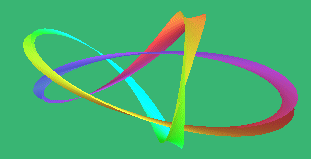 |
The download includes yourFree Test drive with all the features completely unlocked. The same download is used if you have already purchased it, or if you want to update to the latest version - for updates just run the installer and install on top of your existing installation. |
More about your download and detailed instructions
Description: You can use it to play beautiful relaxing 3D animations or make new ones of your own. Run it as a screen saver - or save your patterns as images or videos, or export your animation frames in the OBJ format to import into other 3D programs.
Lissajous 3D is a program for Windows. It comes complete with a free 30 day fully featured Test drive with all the features unlocked just as they are for the purchased program.
To download click on the link below.
Setup Lissajous 3D [6.6 MB].
Or use Right click and choose Save Link As. Take a note of where you saved it.
You use the same download if you have already purchased the program or to update Lissajous 3D to the latest version.
Please be patient and wait for it to download completely.
How long it takes to download - On most broadband connections it may take a minute or so to download depending on your connection speed. With a fast broadband it will only take a few seconds. It may take several minutes if you have a slow connection, and it will take about 16 minutes to download if you are on 56K dial up.
You can add extra textures - and extra skins - using these installers: Lissajous 3D Extra Skins [0.65 MB] and Lissajous 3D Extra Skins (2) [1 MB]. See the Extra Skins page for details.
After the download
Once the download is complete, the browser may offer to run it automatically. If not, look in the save folder for Lissajous_3D_Setup , and run it (usually with a double click).
Or if you chose Run from its present location just wait and it will run automatically.
You may then be asked to give your permission for the program to run.
On It requires administrative privileges to make shortcuts in the All Programs menu, also on the desktop (if you ask for that), so you may be asked to give it permission to install.
may be warned that the publisher of the software couldn't be verified. Unfortunately, I am unable to support the XP verification initiative in its present form. Not many software publishers do. Again just say Yes it is okay to go ahead.
All the programs on this site are adware, malware and virus free. For an independent report, see the McAffee site advisor web safety ratings for robertinventor.com
The install
You will see this screen next, where you can choose what to install - most users will choose to install everything:
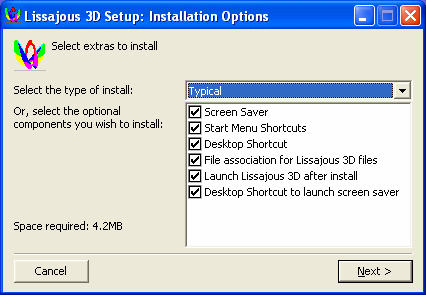
The desktop shortcut to launch screen saver lets you start up the screen saver's swirling Lissajous shapes immediately at any time you like. This way of running it doesn't change your screen saver. So you can use it to look at the Lissajous shapes even if you have something else set as your regular screen saver.
The screen saver desktop shortcut can also be used with a right click as a quick way to set Lissajous 3D as your current screen saver.
Press Next .
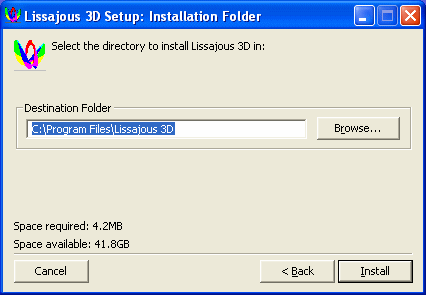
Glance at the install directory to see if that is where you want to install it - the preset location of C:\Program Files\Lissajous 3D will be suitable for most users of XP and earlier.
As with some other programs of this type, Lissajous 3D is configured to install into C:\Programs as the Preset install folder for Vista.
To change the location, use the browse button to navigate to wherever you want to install it. Suggestions might include (create the folder if it doesn't exist yet), or , or .
Click Install . Finally click Close , and the installation is complete. Lissajous 3D will run straight away.
To run it again in the future, look for the Lissajous 3D icon on your desktop:

You can also find it at: Start | Programs | Lissajous 3D | Lissajous 3D .
To set Lissajous 3D up as the screen saver for your computer
You'll find an option in the installer: INSTALL as your SCREEN SAVER - preset to selected. Just leave it selected. After the install you will get an opportunity to review your settings for Lissajous 3D.
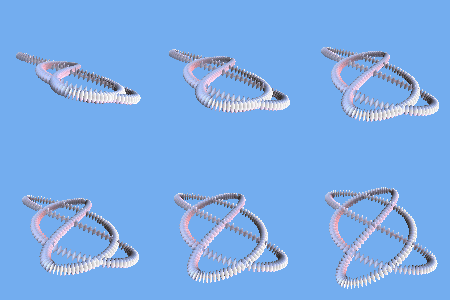
Note that if you set Lissajous 3D as your screen saver, your test drive starts automatically the first time the screen saver runs. This helps new users who only want to try out Lissajous 3D as a screen saver. If you need a second or third test drive, e.g. to try out the program itself or some particular feature of special interest, contact me and I'll do you one.
After the install
Now you can delete the installer itself if you wish - the file you downloaded - as the installation is complete. Or you may wish to keep it for possible future use to save the need to redownload if you ever need to reinstall it.
This installer is very system friendly. It doesn't change any system files or settings. All it does is to install Lissajous 3D into its own folder, and add shortcuts to it to the desktop (if wished) and the Start menu, and install the screen saver if desired.
The old version 2.0 is also still available for anyone who needs it: Lissajous_3D_2.0_Setup [1.8 MB]